Winlator APK For Android
Information
| App Name | Winlator APK |
| Latest Version | v11.1.0 |
| Publisher | BrunoSX |
| Platforms | Android |
| Size | 150 MB |
| Price | Free |
| Category | Tools |
| Required Android Version | Android 5.0 and Above |
| Get it on |  |
Overview Of the Winlator APK
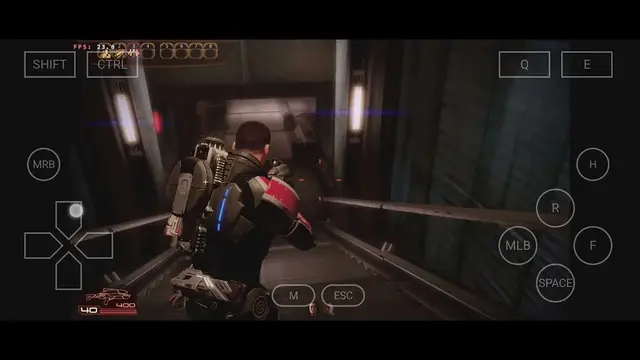
Imagine playing pc games without pc isnt it surprising? But not anymore, play GTA: San Andreas on an Android device without the need for a PC with the help of Winlator APK, because it provides everything that your device needs to run a PC game. There are some situations when gamers want to play pc games, but they dont have any pc in their home, so they use this app and play wonderful games easily.
Winlator APK: What is it?
Winlator APK is an Android tool that provides an environment to run PC Games and Apps in android device. At certain times when user have some work or remember about work outside of their home, they dont have a laptop at that time, so they use Winlator APK to run PC software in android device, such as Microsoft Office, Notepad ++,7-Zip, or many more. Users don’t need to use the service from the cloud to run certain apps or games in the android.
Who Uses Winlator APK?
Some students have some projects or homework to complete, and they need a PC to complete this work, but they dont have a PC or a laptop at that time, so they use this application to run on any PC or desktop, so using this, they can complete their work easily. Gamers dont want to waste money in an internet cafe to play games on a PC, so they use this application and play games on this Android without paying any money to the internet cafe.
How Winlator APK Works?
Winlator works on the compatibility and translation layer, like Wine, Box86/Box64, to convert Windows commands that Android can understand. Using Winlator Emulator, users dont have to use the cloud for accessing games or PC software. This app allows certain Windows x86/x64 applications to run on an Android device that uses ARM technology.
How to Use Winlator APK?
First of all, Winlator Download and install in your Device, then it asks for some permissions, so give the essential permissions to the application. Then create a new container on this app, it works as a window-like environment where your apps can run, click on the + button, or adjust some settings such as Resolution, Graphics, CPU settings, or many more, then add the software or game you want to play. after then, you can install and run the application.
User Experience
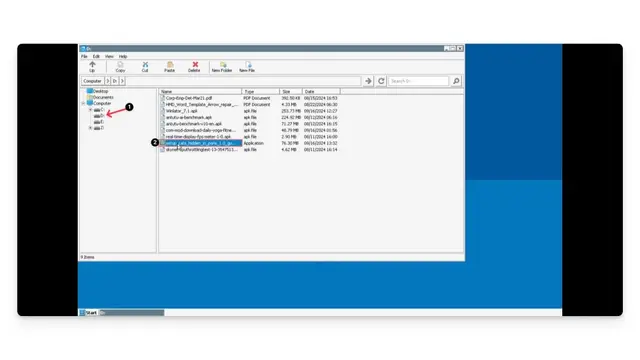
Users eventually use Winlator APK to complete some tasks that they can’t do in android device. Student easily create presentations and spreadsheets for their projects, completing them with an Android device; they dont need a PC. Developers can change or understand code from anywhere by using just a mini screen. Also, some users love to edit beautiful pictures; they can edit them with their Android device, so they dont need to buy any PC or software to edit their photos.
Features Of Winlator APK
Windows Environment Feature
For users, conventional use creates a compatible environment in your Android so it can run Windows applications or games easily. Also, some users work with multiple projects, and they run multiple Windows apps with multiple containers in the Winlator APK.
Graphics / Performance Feature
User usually adjust apps’ performance according to their preferred choice, so when they work on their project, they can work perfectly. Also, gamers adjust Graphics for playing games because Winlator APK provides graphics drivers that give you better compatibility.
Use PC Applications and Games
Users usually use older x86 and x64 PC applications in the Winlator APK, which can run lightweight software in the android. Gamers also play games with this because it provides an environment that supports lightweight games.
Container Management Features
Creates a separate container for every app and game that you use with Winlator APK. Also, manage every container with this application because it lets you manage every container, so users can use multiple container sane time without closing the first one.
Controls & Input Customization
With Winlator APK, users use a touchscreen when they work on something simple or easy. But when they work on bigger projects, or it consumes a lot of time, they use a keyboard and mouse because it supports all input devices, whether it is an Android or a PC device.
Guide Section / Tips
- Use lighter Software and games for better performance
- Always create a different container for different apps and games
- Adjust your graphics settings based on performance
- Close background apps for
- Use a keyboard or a mouse for better control.
- Avoid any unknown .exe files
What is the Winlator APK Download Process?
- Open the happymodprime.com on your mobile.
- Find the “Winlator APK” using the search box.
- Open the article, read, and scroll down.
- Get the download button and click.
- The download process is complete in a few minutes.
How to Install Winlator APK on Android?
- Open the download file and click the install button.
- The installation process is complete in a few seconds.
- Open your mobile settings and allow unknown sources.
- Finish the installation and enjoy the game
FAQs About Winlator APK
Q. What is the use of Winlator APK?
Winlator emulator helps users to run PC games and applications on their Android devices. Using this, you can run lightweight apps and games on Android.
Q. Using Winlator APK, can I install Windows on Android?
No, it does not install a complete Windows system on the Android device, but it can create an environment like a Windows system so some lightweight Windows software can run on the Android.
Q. Can I play PC games and software on the Android Device?
Yes, using this app, you can play compatible lightweight software or games that are usually old, and it depends on your hardware and game requirements in your Android device
Q. Do I need an Internet connection to use Winlator APK?
No, if you’ve downloaded all the files on your Android device, you dont need any internet connection to use this application. You can use this app offline without any internet connection.
Q. Can I use a keyboard, controller, or Mouse with Winlator APK?
Yes, you can use external input devices such as keyboards, a mouse, or a controller with Winlator APK.
Conclusion
It is a useful solution for those users who can’t afford to buy a PC, so they can use this Winlator APK to access desktop software. Also, play desktop games when you have free time with the best graphics on your Android. Manage all the software and applications with just one app easily and conveniently.