Shizuku APK Download v13.6.0 Latest Version

Information
| App Name | Shizuku APK |
| Latest Version | v13.6.0 |
| Publisher | Xingchen Rikka |
| App Size | 3 MB |
| Platform | Android |
| Required Android Version | 7.0 and Up |
| App Category | Tools |
| Get it on |  |
| Price | Free |
Overview of Shizuku APK
Shizuku APK is a free tool that helps Android users who rely on advanced Android tools that need higher privileges to work consistently. It allows users to run apps with elevated app permissions without requiring root access. The Shizuku APK download and setup process is straightforward, enabling users to connect their devices easily. The app operates by creating a bridge between ADB and other installed applications. Its aim is to simplify the process so users can interact with system-level features while maintaining the security of the device. Shizuku APK download is particularly helpful for developers who need to test their applications or for users looking to leverage specific features across different applications.
What Exactly Is Shizuku APK?
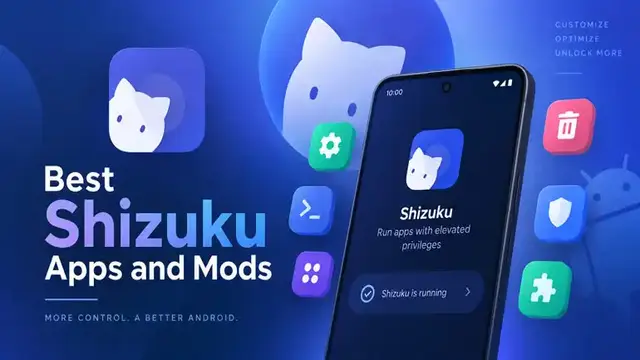
Shizuku is a utility/service for Android that allows other apps to perform certain advanced Android functions using ADB (Android Debug Bridge) or system-level permissions. For example, an app on Android needs to perform a task that standard app permissions do not allow. But with the Shizuku APK, that task can be performed because it creates an Android system API. In other words, Shizuku acts as a bridge or middle layer.
How to use Shizuku APK
Using Shizuku APK on an Android device is very easy and simple.
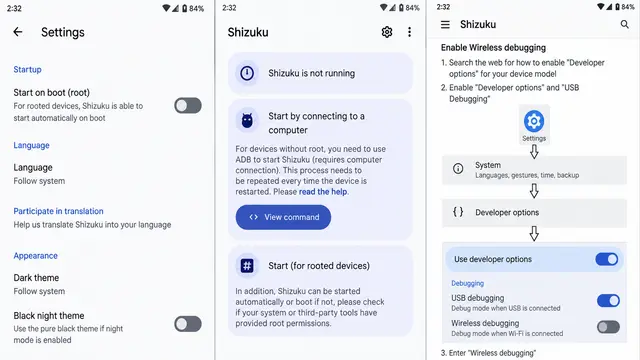
- First, go to your device settings and enable the developer options. You have to tap on the build number around 5 to 6 times, and it enables it.
- Now go to the developer options and start wireless debugging.
- Open the Shizuku APK and choose “start via wireless debugging” and pairing options.
- You have to choose the “Pair via pairing code” option.
- Your device sent you a 6-digit pairing code. Simply enter that code on the Shizuku APK.
- Start the application after pairing is complete. Properly follow these simple steps to use Shizuku APK.
Features of Shizuku APK
Binder-Based API
The Shizuku APK download exposes a binder service that client apps can use to call supported system APIs directly. It avoids shell parsing issues and command length limits for use. Requests move through a stable interface that is less affected by different devices.
Speed and stability
Shizuku handles operations through fast IPC instead of ADB shell commands. During repeated tasks, supported tools respond fast and fail less. When you run scripts, frequently change settings, or automate routine actions, this becomes more helpful.
Wireless ADB support
Unlike other tools, Shizuku APK connects easily via modern Android wireless debugging tools. That means you don’t always need a computer or a rooted device.
Developer-friendly integration
Shizuku APK download provides clear APIs and documentation so developers can adapt apps that normally require root shell access to work smoothly via ADB instead.
Approve, deny, or revoke access
Shizuku Download has a manager that lists client apps that are requesting the service. You have access to approve, deny, or revoke at any time from one screen. Those clear indicators help you to see which apps have permission and which are pending.
Guided setup
Shizuku provides on-screen tips that verify required permissions and highlight common configuration issues. It helps developers to make documented APIs and examples straightforward.
Unified permission management
Instead of granting ADB permissions to individual apps repeatedly, Shizuku download and safely handles requests for other compatible apps.
What is the Shizuku APK download process?
Shizuku download process:
- Open a browser on your device.
- Visit happymodprime.com.
- Search “Shizuku APK” in the search box.
- Click on the article, read it, and scroll down.
- Click on the download button.
- Wait till the download is completed.
What is the Shizuku APK installation process?
Shizuku APK installation process:
Follow these steps:
- Go to the device settings and enable unknown sources.
- Open the downloaded file in your file manager.
- Click on the install button.
- After installation is complete, you can use the app.
FAQs
Can the Shizuku APK run without WiFi?
Yes, you can use the Shizuku APK without an active wifi connection once it is running, but you generally need a wifi network to initially start the service.
Is it safe to use Shizuku APK?
Yes, it’s safe to use because it is an open-source tool built by trusted developers.
Is Shizuku APK free to use?
Yes, you can use and explore Shizuku APK completely free.
What mainly Shizuku apk used for?
Shizuku APK is mainly used to grant specialised apps system-level powers on Android devices without requiring you to root your phone.
Conclusion
Shizuku APK provides a platform for Android users to interact with their Android devices in a more powerful way. It opens a door to a range of functionalities that enhance user experience by enabling privileged access and supporting multiple applications. Shizuku APK download focuses on security and user control to ensure that users can customise their Android devices without compromising safety. Developers can access the source code and comprehensive guides to integrate Shizuku into their applications for further enhancements. Shizuku APK download and start using advanced functionalities of your Android apps without compromising safety.