AutoDraft AI APK Download Latest Version for Android

Information
| App Name | AutoDraft Ai APK |
| Version | v0.4.0 |
| Publisher | Autodraft AI |
| Platforms | Android |
| Size | 6.4 MB |
| Required Android Version | Android 7.0+ |
| File Format | APK |
| Category | Productivity |
| Last Updated | November 27, 2026 |
| Language | English |
| Mod Features | Free + Paid plans |
| Price | Free |
Introduction
Creating animated videos and visual stories requires creativity, planning, and the right tools. AutoDraft AI APK Download is a great option for users who want to explore AI-powered animation and make the video creation process easier. The application provides a creative environment where users can develop characters, build scenes, add voiceovers, and bring their ideas to life through animation. Whether you are a beginner interested in cartoon creation or someone who regularly produces content for YouTube and social media, AutoDraft AI offers a convenient way to experiment with animated videos without requiring extensive professional animation experience.
If you want to explore its creative tools, understanding the features and installation process can help you get started. In this guide, we will discuss everything about AutoDraft AI, including its features, benefits, usage instructions, and how to find the AutoDraft AI APK Download for Android.
What Is AutoDraft AI APK?
AutoDraft AI is an AI-powered animation and video creation platform designed to help users turn their creative ideas into animated content. The application combines different AI tools and editing capabilities, allowing users to work with characters, backgrounds, scenes, dialogue, and animations in one place. Instead of creating every visual element manually, users can explore AI-assisted features to develop their projects and customize the results according to their preferences.
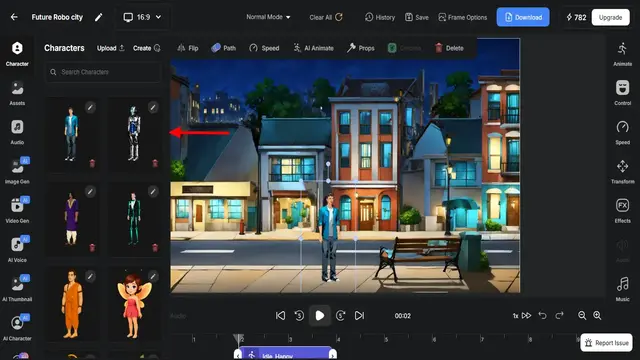
The platform focuses on making animated storytelling more accessible for different types of creators. Users can create characters, generate images, customize scenes, add voiceovers, and use lip-sync features to make their videos more engaging. It also includes editing options such as timeline controls, camera movements, transitions, and visual effects, giving creators more flexibility when arranging their projects. If you are interested in making cartoon animations, storytelling videos, or other creative content, AutoDraft AI provides a useful workspace to explore different possibilities.
Key Features of AutoDraft AI APK
AI Video Generation
One of the main features of AutoDraft AI is its AI-powered video creation capability. It helps users turn creative ideas into animated video scenes without building everything manually. This can be useful for creating storytelling videos, cartoon content, and other visual projects.
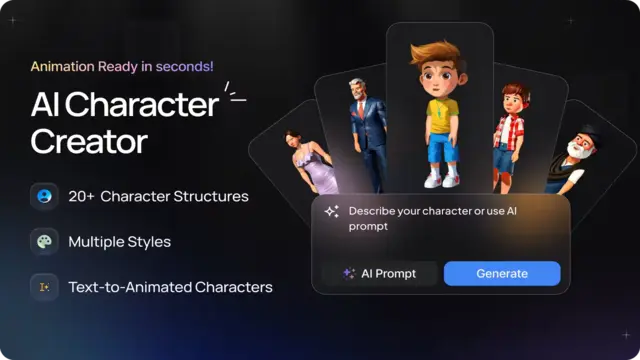
AI Character Creation
Character creation plays an important role in animated storytelling. AutoDraft AI allows users to create and customize characters for their projects. You can develop different character appearances and use them to build stories with a more consistent visual style.
AI Image and Background Generation
Creating suitable backgrounds and visual elements can take considerable time. With AI image generation capabilities, users can explore different visual ideas and create backgrounds that match their scenes, helping make their animated projects more appealing.
AI Voiceover Generation
Voiceovers help make animated videos more expressive and interesting. AutoDraft AI includes AI voice generation capabilities that can be used to add narration and character dialogue to videos. This is particularly useful for storytelling, educational content, and animated explainers.
Automatic Lip Sync
Matching character movements with spoken dialogue can make animations feel more natural. The lip-sync functionality helps synchronize character mouth movements with audio, making conversations and narrated scenes more engaging.
Timeline Video Editing
AutoDraft AI also provides timeline-based editing controls for organizing different elements of a project. Users can arrange scenes, manage visual layers, adjust animations, and make changes to the overall video sequence. This gives creators more control over how their final projects look.
Camera Movements and Animation Effects
Camera movements and animation effects can add more depth to animated scenes. Users can experiment with different camera angles, movements, and visual effects to make their videos more dynamic rather than relying on static scenes.
Scene Transitions and Chroma Key
Smooth transitions help connect different scenes and maintain the flow of a video. AutoDraft AI also offers chroma key support, which can help creators work with backgrounds and combine visual elements when developing their projects.
Creative Storytelling
The application is useful for people interested in creating animated stories and visual narratives. By combining characters, backgrounds, dialogue, and scene editing, users can develop different types of storytelling content for online platforms.
How to Use AutoDraft AI APK?
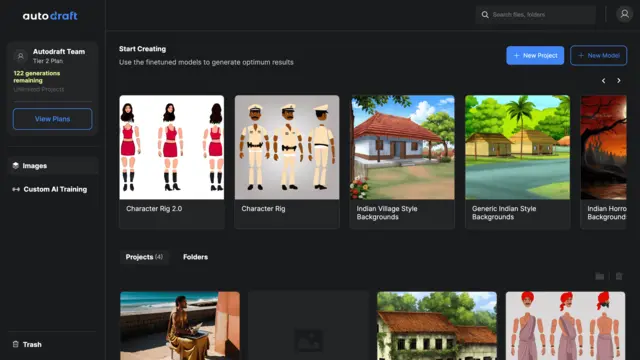
Getting started with AutoDraft AI is easier when you understand the basic workflow of creating an animated video. The application provides different creative tools that help users develop characters, build scenes, add audio, and customize their projects. If you are new to AI-powered animation, follow these general steps to get started.
1. Download and Install AutoDraft AI APK
First, find the AutoDraft AI APK download page from a trusted source. If a compatible Android APK is available, download the file and install it on your device. Open the application and follow any on-screen instructions to complete the initial setup.
2. Start a New Project
After opening the application, explore its main workspace and look for the option to create a new project. Choose the available project settings according to the type of animation or video you want to make.
3. Create Your Characters
Use the available character creation tools to develop characters for your video. Experiment with different appearances, poses, and expressions to make them suitable for your story.
4. Generate and Customize Scenes
Start building your video by creating scenes and selecting suitable backgrounds. You can experiment with AI-generated visual elements and arrange them according to the story or message you want to communicate.
5. Add Voiceovers and Lip Sync
If your project includes dialogue or narration, use the available voiceover tools to add audio. You can also explore lip-sync functionality to synchronize character movements with spoken dialogue.
6. Edit Your Animation
Once your scenes are ready, use the editing workspace to arrange the timeline, adjust visual elements, add transitions, and experiment with camera movements. Review each scene to make sure the video flows naturally.
7. Preview and Export Your Video
Before completing your project, preview the entire animation and check the scenes, audio, and transitions. Make any necessary adjustments and use the available export option to save your finished video.
Tips to Get Better Results with AutoDraft AI
Creating good animated content is not only about using AI tools. A little planning can also improve the final result. Here are some useful tips to keep in mind while working with AutoDraft AI.
- Start with a clear idea: Decide what type of video you want to create before starting a project.
- Write a simple script: Prepare your story or dialogue in advance to keep scenes organized.
- Maintain character consistency: Use similar character designs and appearances throughout your animation.
- Choose suitable backgrounds: Select backgrounds that match the subject and mood of each scene.
- Keep voiceovers clear: Use understandable narration and make sure dialogue matches the characters.
- Use camera movements carefully: Avoid unnecessary movements that distract viewers from the main content.
- Preview before exporting: Check transitions, character movements, and audio synchronization before saving your video.
- Experiment with different styles: Try different animation approaches to discover what works best for your content.
Pros and Cons of AutoDraft AI APK
Pros
- AI-powered video creation.
- Easy character customization.
- AI voiceover and lip-sync support.
- Useful animation and editing tools.
- Suitable for storytelling and content creation.
Cons
- Some features may require internet access.
- AI processing can take time.
- Beginners may need practice.
- Performance depends on device compatibility.
How to Download AutoDraft Ai APK?
Downloading AutoDraft Ai APK is a simple process. Follow these steps to find and download the APK file to your Android device.
- Open a web browser on your Android phone.
- Visit HappyModPrime.com.
- Search for AutoDraft Ai APK.
- Open the AutoDraft Ai APK download page.
- Check the APK version, file size, and compatibility details.
- Tap the download button to save the APK file to your device.
How to Install AutoDraft Ai APK on Android?
After downloading the AutoDraft Ai APK file, follow these simple steps to install it on your Android phone.
- Open your phone’s Settings.
- Find Install Unknown Apps under Security or Apps.
- Allow installation from your browser or file manager.
- Open File Manager and find the downloaded APK file.
- Tap the file and select Install.
- Once installed, open AutoDraft AI APK and start creating amazing animated videos, designing characters, generating AI scenes, and bringing your creative stories to life.
Frequently Asked Questions (FAQs)
Q1. How do I install AutoDraft AI APK on Android?
Download the AutoDraft AI APK file from a trusted source. Once the download is complete, open the file, allow installation from the selected source if required, and follow the on-screen instructions to install the app on your Android device.
Q2. Can I use AutoDraft AI for YouTube videos?
Yes, AutoDraft AI can be used to create animated stories, educational videos, explainers, and other visual content for platforms like YouTube, subject to the app’s usage and export terms.
Q3. Does AutoDraft AI support lip sync?
Yes, AutoDraft AI offers a lip-sync feature that helps synchronize character mouth movements with spoken dialogue, making animated conversations look more natural.
Q4. What can I create with AutoDraft AI?
You can use AutoDraft AI to create animated stories, cartoon videos, educational content, explainer videos, and other visual projects using its AI-powered creative tools.
Q5. Can I download AutoDraft AI APK without Google Play Store?
Yes, you can download and install AutoDraft AI APK from a trusted third-party source without using Google Play Store, provided the APK is compatible with your Android device.
Conclusion
AutoDraft AI APK is a useful option for users who want to explore AI-powered animation and video creation on their Android devices. With features like AI video generation, character creation, voiceovers, lip sync, and creative editing tools, the application offers different ways to turn ideas into engaging visual content. If you are looking for more creative flexibility and want to experiment with animated videos, AutoDraft AI is worth exploring. Download AutoDraft AI APK Download Latest Version for Android from HappyModPrime.com and get started with its creative tools. Check the available version, file size, and compatibility before installing the app to enjoy a smooth experience.