ProSafe APK 1.2.0 for Android with Emergency Support Features

Information
| App Name | ProSafe APK |
| Latest Version | v1.2.0 |
| Publisher | PROSAFE SOLUTIONS LLC |
| Platforms | Android |
| Size | 108 MB |
| Required Android Version | Android 7.0+ |
| File Format | APK |
| Category | Productivity |
| Last Updated | November 24, 2026 |
| Language | English |
| Mod Features | Free to Use |
| Get it on |  |
| Price | Free |
What Is ProSafe APK?
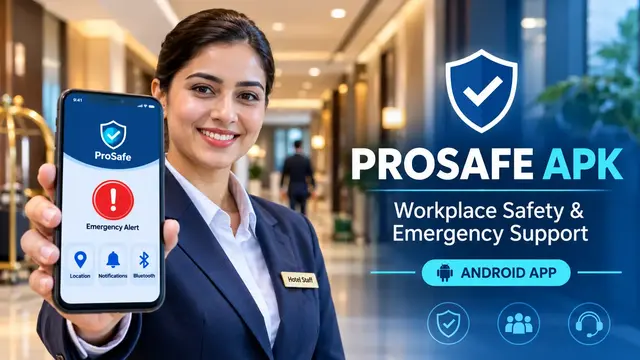
ProSafe APK is an Android application designed to improve workplace safety, especially for people working in hotels and the hospitality industry. It helps employees send emergency alerts when they need assistance and share their location with the hotel staff. This makes it easier for the team to respond when an employee faces an unsafe situation.
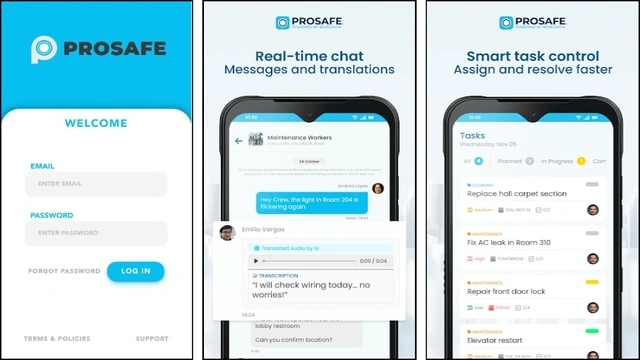
The app includes useful features such as a panic alert button, location sharing, video evidence recording, QR code scanning, and built-in chat. These tools help employees stay connected with their team and make it easier to manage emergency situations.
ProSafe is not just a regular security app for smartphones. It is mainly designed for hotel employees and works as part of a managed safety system. Users generally need an account connected to a participating hotel or organisation to access its services.
With its simple approach to communication and emergency support, ProSafe APK provides hotel staff with a convenient way to request help when needed.
Key Features of ProSafe APK
Emergency Panic Button
The panic button is one of the most important features of ProSafe. Employees can use it to send an emergency alert when they feel unsafe or need immediate help. This allows the responsible hotel staff to respond as quickly as possible.
Location Sharing
ProSafe APK can share an employee’s location with the hotel’s authorised staff during an emergency. This helps the response team understand where assistance is needed instead of wasting time searching for the person.
Video Evidence Recording
The app supports video recording when an emergency alert is active. This can help capture important details about an incident and provide useful information for later review.
QR Code Scanning
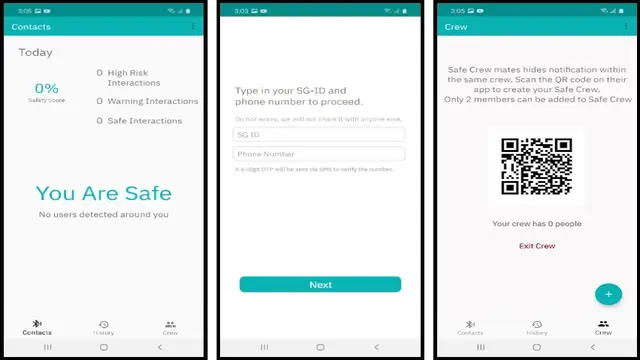
With the QR code scanning feature, employees can scan codes placed in different rooms or work areas. It helps record their current location and makes it easier for the team to identify where they are inside the hotel.
Built-in Chat
ProSafe includes an integrated chat feature that allows hotel employees to communicate with other staff members. They can use it to share messages and coordinate with their team without switching to another messaging app.
Evidence History
Employees can view the records of previously stored evidence through the app. This makes it easier to access information related to earlier alerts and incidents when needed.
Bluetooth Panic Button Support
ProSafe also supports a Bluetooth panic button, giving employees another way to trigger alerts. The updated system includes improved battery performance and connection status notifications.
Improved Alert Notifications
The app provides an active alert banner to make it easier for users to see when an emergency alert is running. The redesigned panic screen also displays the last known location, helping users stay informed during an active alert.
How Does ProSafe APK App Work?
ProSafe APK works by connecting hotel employees with their safety and response teams through a mobile application. It allows employees to send emergency alerts, share their location, and communicate with other staff members when they need help.
The app is simple to use, and its main purpose is to make emergency communication easier. Here is how it works:
1. Install and Set Up the App
First, employees need to install ProSafe APK on their Android devices. They can then sign in using the account provided by their hotel or organisation. The app needs to be connected to the hotel’s ProSafe system to access its safety services.
2. Activate an Emergency Alert
If an employee faces an unsafe situation, they can use the panic button in the app to send an emergency alert. The system then notifies the designated staff members so they can take action.
3. Share Location Details
When an alert is activated, ProSafe APK shares the employee’s location with the authorised response team. Employees can also scan QR codes in different rooms or areas to help record their location within the property.
4. Record Important Evidence
While an alert is active, the app can record video evidence related to the incident. This information can be stored and viewed later through the evidence history feature.
5. Communicate With Team Members
ProSafe APK has a built-in chat feature that allows employees to communicate with other hotel staff. This helps team members share updates and coordinate their response during an emergency.
6. Get Help From the Response Team
Once the alert reaches the responsible team, staff members can check the available location and incident details and respond accordingly. This helps them understand the situation and provide assistance.
Why Should You Use ProSafe APK?
ProSafe APK is worth considering for hotel employees because workplace safety is an important part of their daily routine. Working in different rooms and areas can sometimes make it difficult to reach the right person when assistance is needed. ProSafe provides a common platform where employees can stay connected with their organisation’s safety system.
Another reason to use the app is its focus on hospitality workplaces. Rather than being a general-purpose mobile application, it is designed around the safety needs of hotel staff. This makes it relevant for hotels that want a more organised way to handle employee safety and emergency situations.
The app also keeps its main tools together, which can make daily use more convenient for employees. If their hotel already uses the ProSafe system, the application can be a practical addition to their work routine.
What’s New in ProSafe APK 1.2.0?
The latest ProSafe APK 1.2.0 update brings several improvements to make the app easier and more convenient to use. The Bluetooth button engine now offers better battery life and out-of-range detection. Users can also see active alerts through a small banner without interrupting their current screen.
The update also adds @mentions in crew chats, making it easier to get the attention of specific team members. The panic screen has been redesigned to display the last known location, while new connection status notifications help users keep track of their Bluetooth button. Along with these changes, the chat interface has received some improvements and bug fixes for a smoother experience.
ProSafe APK Permissions and Security
ProSafe APK requires certain permissions to provide its main features. Here are the important details based on its Google Play listing.
Required Permissions
- Location: Used to share the employee’s location with hotel staff during emergencies.
- Camera: Needed for recording video evidence when an alert is active.
- Bluetooth: Helps connect the app with an external panic button.
- Notifications: Keeps users informed about active alerts and button connection status.
Security and Privacy
- Data Sharing: No data is shared with third parties, according to the developer.
- Data Collection: The app may collect health and fitness information and device or other IDs.
- Data Encryption: Data is encrypted while being transferred.
- Data Deletion: Google Play lists that collected data cannot be deleted.
How to Download ProSafe APK?
Downloading ProSafe APK to your Android device is an easy process. You can find the APK file directly on this page and follow the instructions below to download it to your phone.
- Scroll down to the ProSafe APK download section on this page.
- Check the available APK version and file size.
- Review the Android compatibility and other file details.
- Tap the download button to start downloading the APK file.
- Wait for the download to complete on your Android device.
- Open your Downloads folder to locate the downloaded APK file.
How to Install ProSafe APK on Android?
After downloading the ProSafe APK file, follow these simple steps to install it on your Android smartphone.
- Open your phone’s Settings.
- Find the Install Unknown Apps option under Security or Apps.
- Allow installation from your browser or file manager if necessary.
- Open File Manager and locate the downloaded ProSafe APK file.
- Tap the APK file and select Install.
- Wait for the installation process to complete.
- Once installed, open ProSafe APK and explore its safety features to stay connected with your hotel team and access emergency assistance when needed.
Frequently Asked Questions (FAQs)
Q1. Does ProSafe APK work without an internet connection?
Some ProSafe features require an active internet connection to send emergency alerts, share location details, and communicate with the response team. Without internet access, certain services may not work as expected.
Q2. Who can use the ProSafe application?
ProSafe is mainly designed for hotel employees and hospitality teams. Employees can use the app if their hotel or organisation has access to the ProSafe safety system and provides the required account.
Q3. Can I delete my ProSafe account?
Account management usually depends on the organisation connected to your ProSafe account. If you want to remove your account or personal information, contact your hotel administrator or the app developer for assistance.
Q4. How does the ProSafe APK app work?
ProSafe connects hotel employees with their organisation’s safety system. Employees can use the app to send emergency alerts, share their location, record important evidence, and communicate with other team members when assistance is needed.
Q5. Can I use ProSafe APK for personal safety?
ProSafe is mainly developed for workplace safety, especially in the hospitality industry. It works with an organisation’s safety system, so users generally need an authorised account. It is not designed as a regular personal safety app.
Q6. How do I check the ProSafe APK version?
You can check the installed version by opening your phone’s Settings, going to Apps, selecting ProSafe, and viewing its app information. The download section also provides the available version details.
Q7. What should I do if the ProSafe APK download fails?
Check your internet connection and available storage space. If the download stops before completion, refresh the page and try downloading the APK file again.
Final Words
ProSafe APK 1.2.0 comes with several practical updates for users who need a workplace safety solution on their Android phones. The updated Bluetooth button engine, improved chat options, and redesigned panic screen make this version more convenient to use. If you are interested in trying the app, check the information and installation steps shared above. Before starting your ProSafe APK download, make sure your device meets the required specifications so you can install the app without any compatibility issues.