Download Technocare APK Latest for Android

Information
| App Name | Technocare APK |
| Latest Version | v1.0 |
| MOD Info | No Ads |
| Download Size | 28.5 MB |
| Platform | Android |
| Require Android Version | 2.3 and up |
| App Category | Tools |
| Price | Free |
Overview
Technocare APK is a popular Android utility that is built to help users bypass the factory Reset Protection verification on supported devices. It provides a simple and effective solution for individuals who are unable to access their smartphones due to a forgotten Google account credential after a factory reset.
Technocare APK has a lightweight design and a user-friendly interface, that’s why it has become popular among Android users for a quick FRP bypass solution. Also, the application does not require technical knowledge, that’s why beginners can also use it.
Users search for Techcare APK Download because of its straightforward functionality, fast performance, and compatibility with various devices. For security purposes, this application is a widely discussed solution for users seeking an easy way to manage FRP verification challenges while maintaining a smooth user experience
What is Technocare APK?
Technocare APK is a modified Android application designed to help users bypass Google Factory Reset Protection(FRP) locks on supported devices. FRP is a security feature introduced by Google to protect smartphones after a factory reset.
The app offers a straightforward process for bypassing this verification screen. It is used for Android users who have forgotten their Google account details or need to regain access to a previously owned device.
One of the main reasons behind the popularity of Technocare APK is its ease of use. Unlike many complex unlocking tools, it provides a user-friendly environment that beginners and experienced users alike can understand.
Features of Technocare APK
Easy-to-Use Interface
Technocare APK has a clean and simple design that makes the application easy to navigate, that’s why users can access the available functions without dealing with complicated menus.
Fast FRP Bypass Process
The application is designed to help users complete the bypass procedure in a relatively short amount of time. This saves users from spending hours searching for alternative methods.
Lightweight Application
The APK file is compact and does not consume large storage space. It works smoothly on many Android devices without affecting the device without affecting overall system performance.
Broad Device Compatibility
It supports various Android smartphones and tablets. Many users utilize it on devices from different manufacturers, making it a versatile FRP solution.
Free to Use
Technocare APK can be downloaded and used without purchasing a subscription. This makes it an attractive option for users looking for a cost-effective solution.
User-Friendly Setup
The installation process is simple and can usually be completed within a few minutes. Users do not need advanced technical knowledge to get started.
Offline Functionality
Some functions can be performed without requiring a constant internet connection, making the tool more convenient in different situations.
Secure Environment
When downloaded from trusted sources, Technocare APK provides a safer way to perform FRP-related tasks while minimizing potential risks. Users should always verify file sources before installation.
Pros and Cons
Pros
- Simple and user-friendly interface
- Fast installation process
- Lightweight application size
- Compatible with multiple Android versions
- Free to download and use
- Quick access
- Minimal hardware requirements
Cons
- Stability issues
- Privacy concern
- Incorrect usage may lead to device issues
How to Download Technocare APK
- Launch your preferred web browser on your Android device.
- Visit a trusted website that provides the latest and secure version of Technocare APK (You can download from happymodprime.com)
- Open the website and find the latest version.
- Click on the download button.
- Wait for the APK file to finish downloading.
How to Install Technocare APK
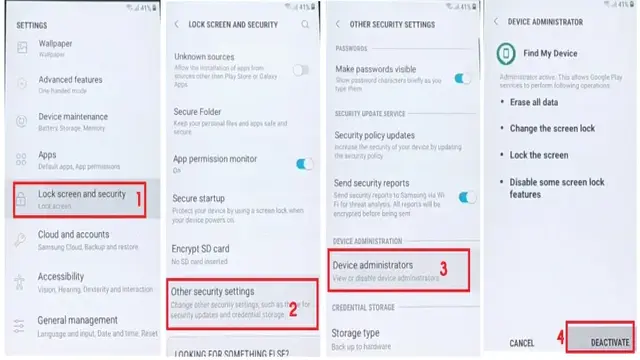
- Open your phone settings.
- Then navigate to the security settings and enable “install from unknown sources” in your device settings.
- Open the file manager on your Android device.
- Navigate to the download folder.
- Open the downloaded file.
- Find the download button and click on it.
- Wait for the installation to complete.
FAQ
Q. Is Technocare APK free to use?
Yes, Technocare APK is generally available as a free application.
Q.Is this application safe to use?
The safety of the application depends on the source from which it is downloaded. Always use trusted websites and scan files before installation.
Q.Which Android versions are supported?
Support varies by version, but many guides indicate compatibility with several Android releases commonly used for FRP bypass tasks.
Q. Why is Technocare APK popular?
Its simple interface, lightweight design, and ability to assist with FRP-related tasks make it a popular choice among Android users.
Conclusion
Technocare APK is a useful Android utility for users who need assistance with Factory Reset Protection verification on supported devices. Its straightforward interface, lightweight structure, and easy installation process make it a convenient option for many Android users.
Whether you are looking for a quick unlocking solution or searching for a reliable Technocare APK Download, this application offers a practical approach that combines simplicity and efficiency. Always download the APK from reputable sources and follow the installation instructions carefully to ensure the best experience.